Effect: ERP sales report & lead identifier
Read-only ASP.NET Core app over a PHC ERP: a sales report with Excel export and a lead identifier with AI company lookup.
- Context
- Effect
- Role
- Solo project
- Period
- Sep 2026 – Oct 2026
- Stack
- C#
- ASP.NET Core
- Razor Pages
- Dapper
- SQL Server
- OpenXML
- AI API
- Windows Service
- Links
- Private project. Proprietary code. Architecture and impact are described in the case study.
Context & problem
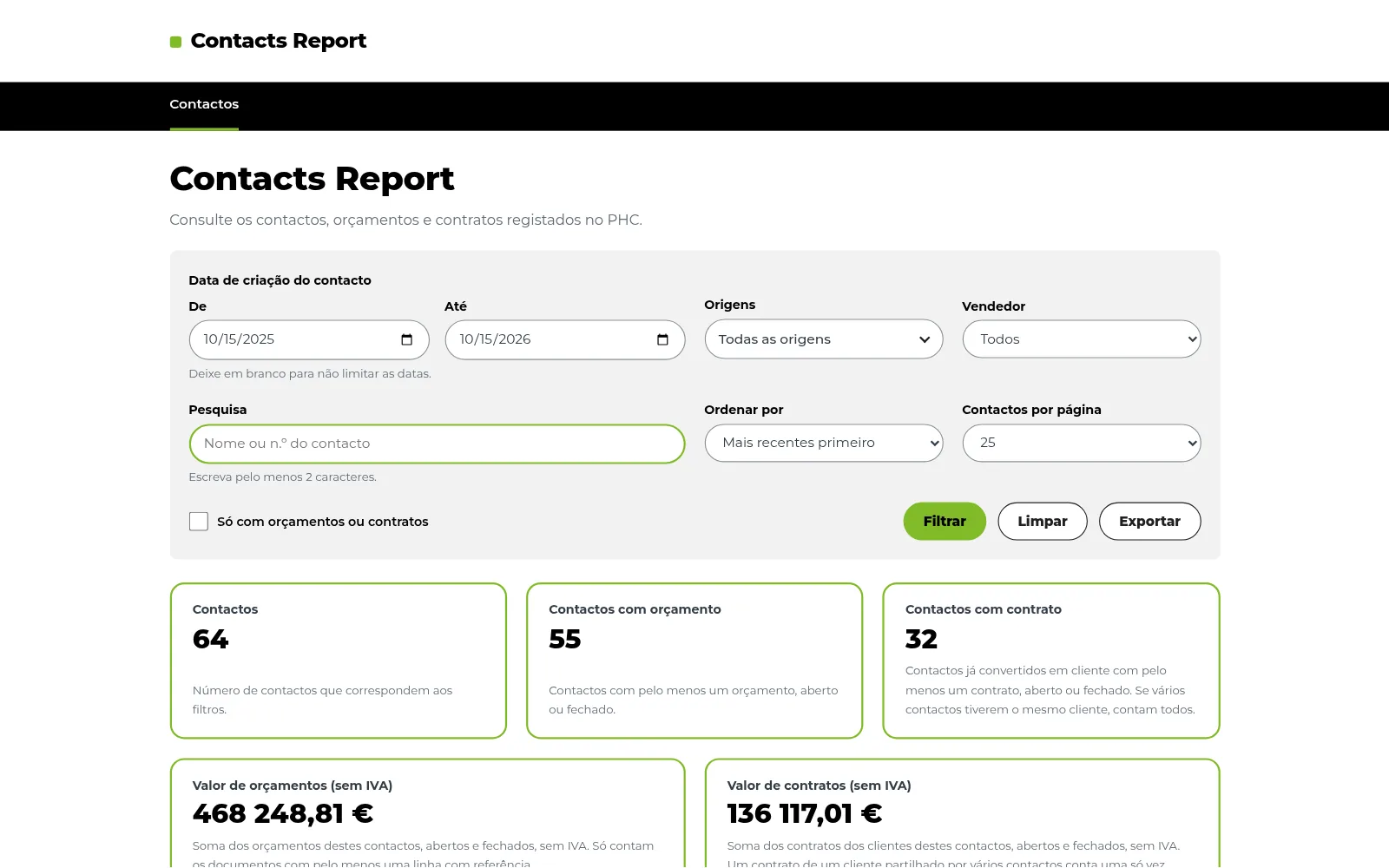
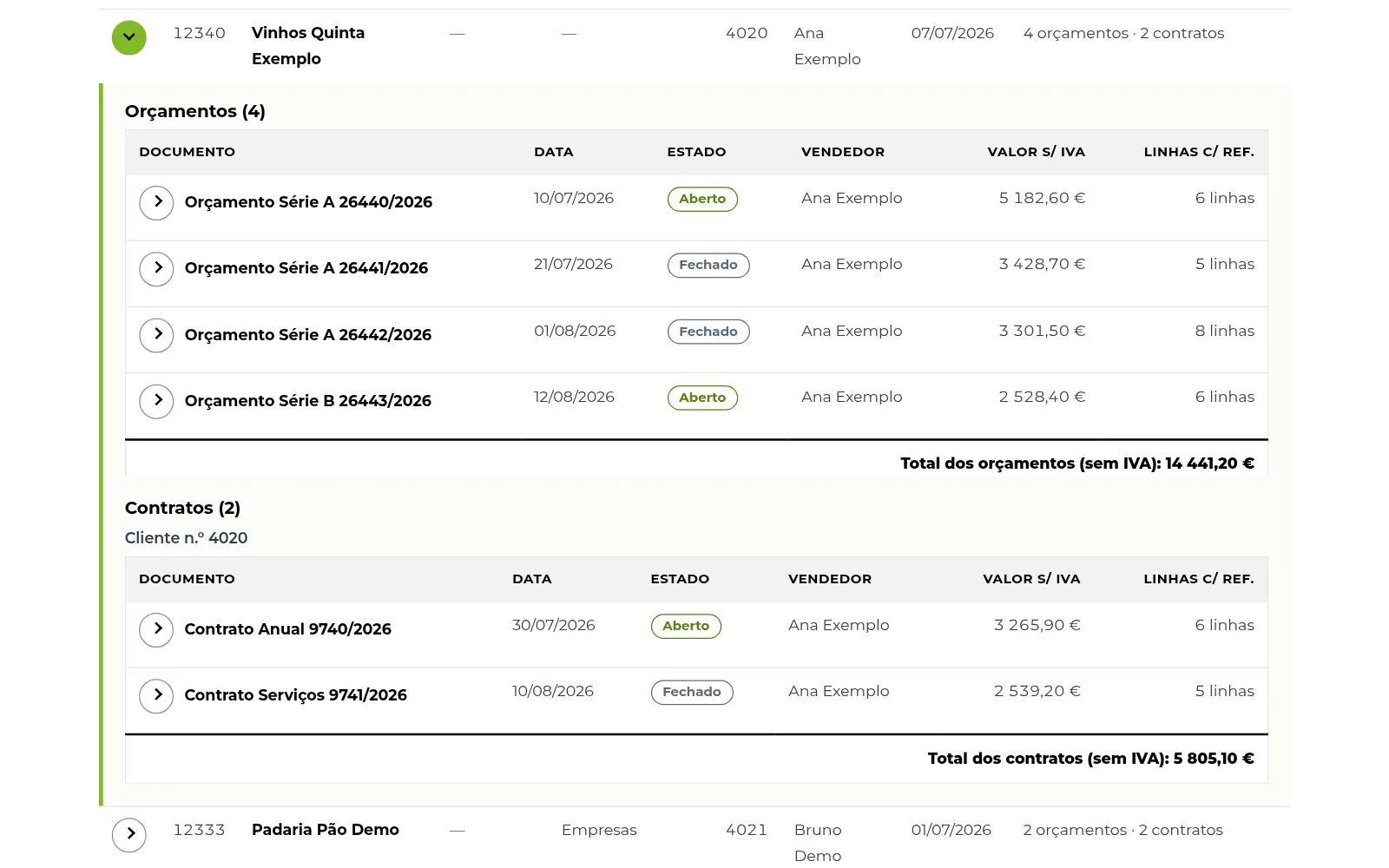
Effect runs its business on the PHC ERP. Its contacts, the quotes sent to them and the contracts signed with them all live in the ERP's SQL Server database, but there was no single place to see a contact together with its quotes and contracts, filter that list and take it to Excel.
A second need came up once the report was in use. When an email arrived from someone new, the team had no quick way to tell whether the sender or their company was already in the ERP, or to find out who the company was.
This was a paid project, and I owned it end to end. Effect is named with permission, and no real data is shown.
Constraints
- Read-only. The app reads the ERP's data and never writes to it.
- Large tables. The ERP's document and document-line tables are large, so nothing could load a whole table into the browser or into memory.
- Internal only. The app runs on Effect's own server and is only reachable from its local network.
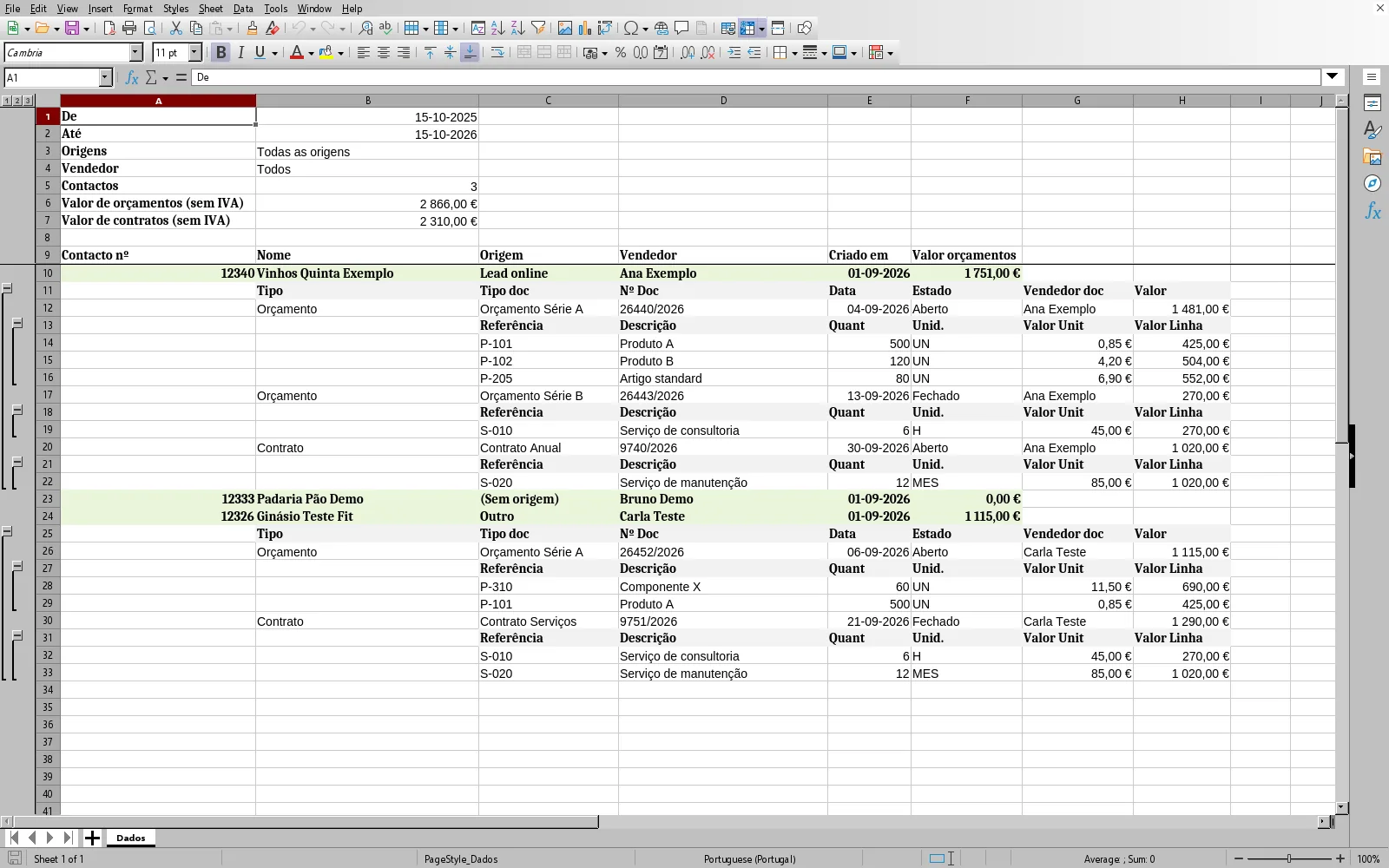
- Exports people can work with. The Excel file had to be readable on its own, with the filters that produced it and the headline figures.
- No false matches. A lead lookup that links an email to the wrong company is worse than one that finds nothing.
Architecture
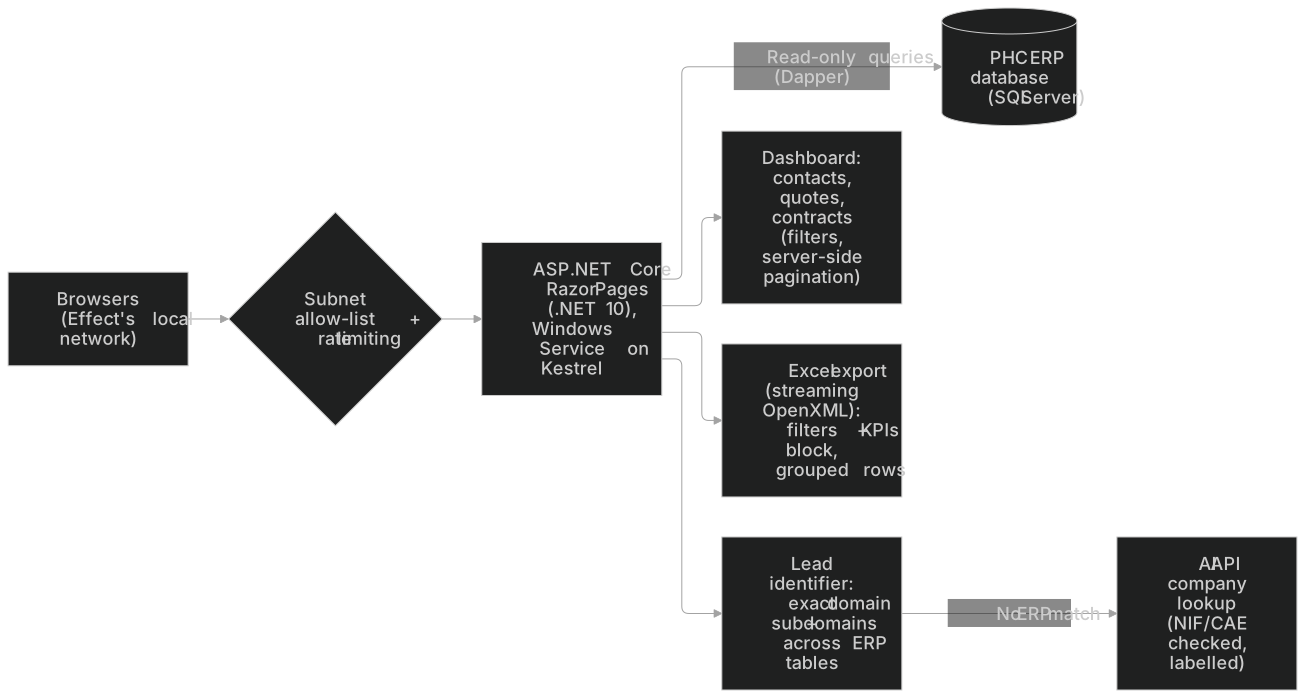
ProblemEffect needed one view of each contact with its quotes and contracts, and a fast way to tell whether an incoming email or domain was already in its PHC ERP.
SolutionA .NET 10 Razor Pages app with read-only SQL access to the ERP: a filterable report with Excel export, and a lead identifier that searches ERP tables and looks up companies with AI.
ImpactThe team filters contacts, quotes and contracts in one place, exports them to Excel, and checks a new lead against the ERP without searching it by hand, with no writes to the ERP.
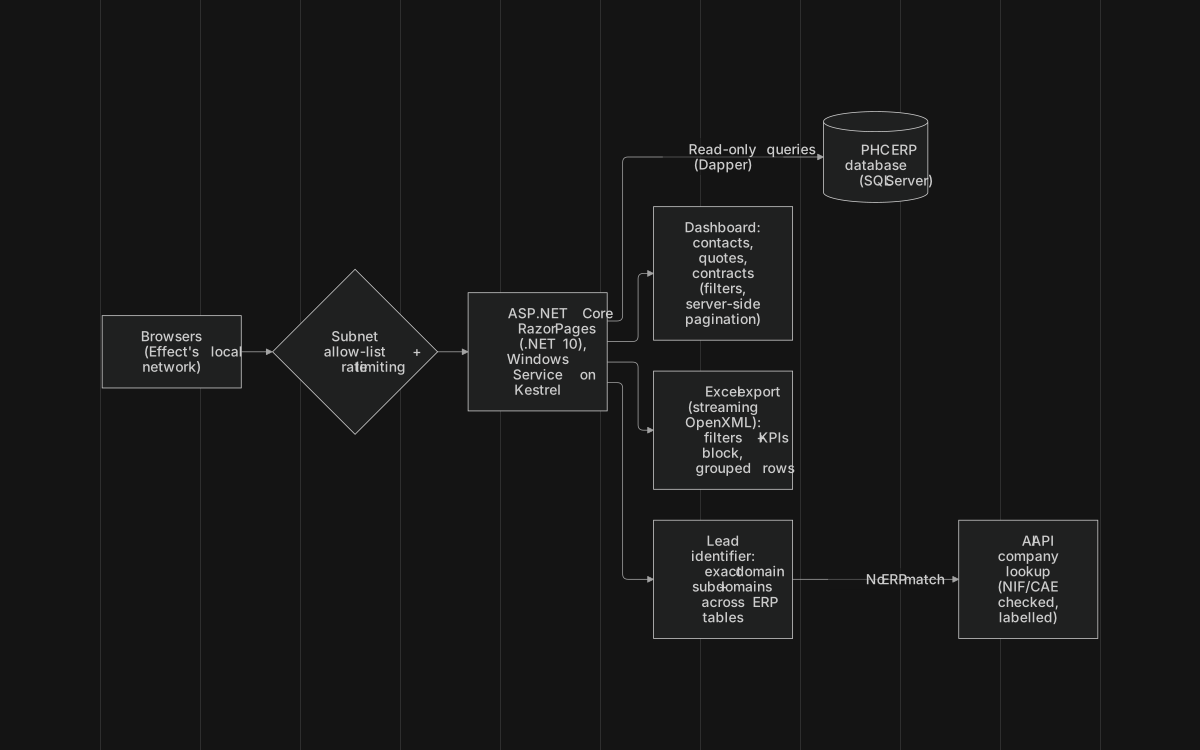
- App. A single ASP.NET Core Razor Pages app on .NET 10, with no separate API.
- Data access. Dapper runs read-only SQL queries against SQL Server.
- Sales report. Contacts and clients, each with its quotes and contracts, behind a set of filters. Pagination happens on the server, so the browser only receives the page it shows. A second date filter limits results by when each dossier was created, and it has to fall inside the contacts' date range.
- Export. The Excel file is written with OpenXML in streaming mode. It opens with a block showing the filters and KPIs, followed by grouped rows that expand to show each contact's documents.
- Lead identifier. Given an email address or a domain, the app searches several ERP tables for a matching contact. It matches the exact domain and its subdomains, and skips lookalike domains that would give false positives. Results are shown per table, with the assigned salesperson highlighted.
- AI company lookup. When the ERP has no match, an AI API looks up the company's legal name, tax number (NIF), business activity and activity code (CAE). The app checks that the NIF and CAE are valid, labels the result as AI-generated, and lists the sources it used.
- Copy-ready summary. The results can be copied as plain text, ready to paste into an email or a CRM note.
- Hosting. The app runs as a Windows Service on Kestrel, on the local network, with a subnet allow-list and rate limiting.
Decisions & trade-offs
- Dapper instead of a full ORM. The app only reads, so hand-written SQL with a light mapper keeps every query explicit. The trade-off: there are no generated queries, and every query is written and maintained by hand.
- Server-side pagination. Filtering and paging run in the database, so the page stays light however large the data is. The cost is a round trip to the server for every page.
- Streaming the Excel export. Rows are written to the file as they're read, instead of building the whole workbook in memory first, so memory use doesn't grow with the size of the export.
- Strict domain matching. The identifier matches a domain and its subdomains only, never a partial string. It may miss a company that uses an unrelated domain, but it won't link a lead to the wrong one.
- AI as a fallback, checked and labelled. The ERP is always searched first. AI answers are validated where they can be (NIF and CAE), always carry a warning and their sources, and are never written back to the ERP.
- A Windows Service on the local network. Running on Kestrel as a Windows Service fits Effect's own server and keeps the tool off the internet. The subnet allow-list and rate limiting add a second layer, so only Effect's network can reach it, and only at a reasonable pace.
Results
Effect's team gets one read-only view of the contacts, quotes and contracts already in the ERP, with an Excel export to share it. They can also check a new lead against the ERP and get a verified company profile when it isn't there yet. No metrics are shown, because the figures belong to the client.
Screenshots