Email Scraper for TakeFreeTours
Scheduled C# job that reads booking confirmations from several platforms via the Gmail API and turns them into validated SQL Server records.
- Context
- Altyra Solutions
- Role
- Took over a scaffolded project and built almost all of it myself, with occasional team support.
- Period
- Mar 2024 – Feb 2025
- Stack
- C#
- .NET
- Gmail API
- SQL Server
- Links
- Private project. Proprietary code. Architecture and impact are described in the case study.
Context & problem
TakeFreeTours runs tours, and its visitors book them through several booking platforms. Every booking arrives as a confirmation email, and every platform formats that email its own way.
Before this project, the visitors for each tour were entered into the database by hand, one confirmation email at a time. It was slow, repetitive work, and it had to keep pace with every new booking.
I started the project during my internship and continued it after I was hired, until February 2025. Starting from an existing scaffold, I owned the project end to end, from the Gmail integration to parsing and data handling.
Constraints
- Several platforms, several formats. Each booking platform sends a differently structured confirmation email, so there was no single format to parse.
- Clean data only. Extracted values had to be validated and mapped to the fields the system expects before they reached the database.
- No duplicates. The same booking must never be inserted twice.
- Gmail as the entry point. The confirmations land in a Gmail inbox, so the integration had to work through the Gmail API.
- Nothing silently lost. An email the scraper can't process still has to reach a person.
Architecture
ProblemEach tour's visitors were entered by hand from booking confirmation emails sent by several booking platforms, each with its own email format.
SolutionA scheduled .NET job reads the inbox via the Gmail API, detects each platform template, validates the data, checks for duplicates and inserts it into SQL Server.
ImpactIt worked as intended and drastically reduced the manual entry of tour visitors from booking confirmation emails.
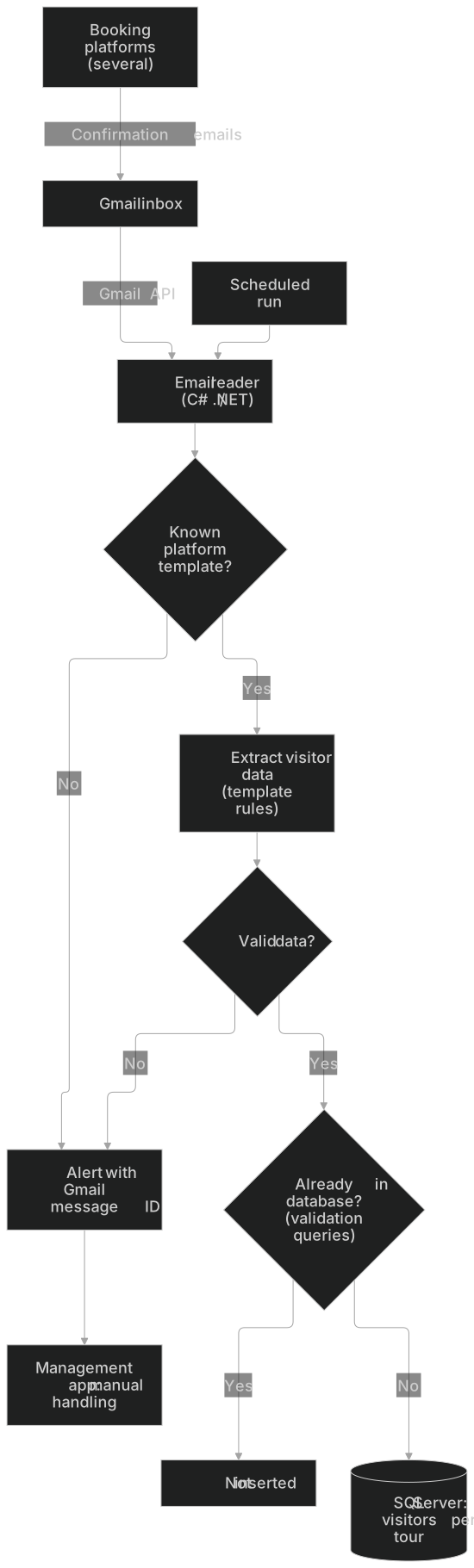
The scraper is a scheduled C#/.NET job that writes to SQL Server. Each run follows the same steps:
- Read. On each scheduled run, the job reads booking confirmation emails through the Gmail API.
- Identify. It works out which platform's template each email follows.
- Extract and validate. It pulls the visitor data out using that template's rules, then validates it and maps it to the expected parameters.
- Check for duplicates. Before inserting, it runs validation queries against SQL Server to make sure the booking isn't already there.
- Insert. Records that are new and valid are written to SQL Server.
- Alert. If an email matches no known template or its data fails validation, the job sends an alert to the management app with the email's Gmail message ID, so someone can handle it manually.
Decisions & trade-offs
- Scheduled runs. The job runs on a schedule rather than reacting to each email as it arrives. The trade-off: new bookings appear after the next run, not instantly.
- Identify the template first, then parse. Each platform gets its own extraction rules instead of one parser trying to handle every format. The trade-off: when a platform changes its email layout, its template has to be updated.
- Validate and deduplicate before inserting. Bad data and repeated bookings are stopped by validation and by queries against the database before anything is written, instead of being cleaned up afterwards.
- Alert instead of guess. When the scraper can't process an email, it doesn't skip it or insert partial data. It sends an alert with the Gmail message ID to the management app, so the exact email can be found and handled by hand.
Results
The scraper worked as intended and drastically reduced the manual entry of tour visitors. Manual work was left for the exceptions the alerts flag. No numeric metrics were tracked, so there are no figures to report.